
Author
Pixels Mark
Release
Intensity
13 MIN READ
A book cover design brief is a short document that gives your designer the key information needed to discuss the project and begin concept work: the approved cover text, your intended reader, the publishing formats you need, a few reference covers with reasons, and a clear note on which production inputs are still being confirmed. This article walks through what goes into a strong brief, shows a completed example from start to feedback, and ends with a blank template you can copy and send.
Jump to: See the completed brief | Copy the blank brief
Quick note
Send the designer the current approved cover text (title, subtitle, author name, flagging any wording still subject to change), your reader and genre, the formats and publishing platforms you need, two to four reference covers with specific reasons, and a clear note on which production inputs are still being confirmed.
What goes into the brief
A useful brief covers five things in plain terms: who the book is for, what it needs to say and show, what formats you need, what visual direction you have in mind, and what is still open. Designers can work with incomplete production information at the concept stage, but they need to know which fields are pending and when those answers will arrive.
Book and reader details
Start with the current approved cover text. Your title, subtitle and author name as they will appear on the cover are the most important inputs you can supply. Note clearly if any wording may still change. A designer who has to guess a subtitle length will lay out the wrong composition. Include the series name and number if relevant.
Add a short description of your reader. Genre and subgenre tell the designer what visual conventions they are working with or deliberately departing from. A one- to two-sentence book summary helps them understand the tone. You do not need to supply demographic profiles or bestseller comparisons. For a children's book, describe the reading stage and intended audience. Our children's book cover design examples show how these inputs can influence cover decisions.
What the cover must communicate
Separate what the cover must do from what you would prefer it to look like. A nonfiction cover that should feel accessible and practical has different constraints from one that signals authority or academic depth. List any mandatory elements (a photograph, a specific colour, a series mark) and note which visual preferences are open to interpretation.
Reference covers
Reference covers are one of the most useful things you can include, and one of the easiest to handle badly. The goal is to give the designer something specific to respond to, not a mood board to copy from.
For each reference, name the book and author, note one visible feature that is relevant to your project, and add a short boundary so the designer knows what to avoid. A useful reference note might read:
"Big Magic, Elizabeth Gilbert, Riverhead Books, 2015, designed by Helen Yentus: the title is set as large physical cutout letters with saturated colour from Holi powder, creating a strong sense of movement. We are not looking for a similar colour palette or the same illustrative technique."
The specific feature that makes a reference useful to name is the one that transfers to your project: hierarchy, contrast, mood, legibility at thumbnail size. The boundary prevents the designer from treating the whole cover as a template to copy. Choose references with clear, compatible reasons rather than adding examples without explanation.
The worked example: The Saturday Notebook
The Saturday Notebook is a fictional adult nonfiction project used throughout this article to demonstrate how a brief, design decisions and revision requests connect. It is not a client project, a published book or a tested reader outcome.
Completed author brief
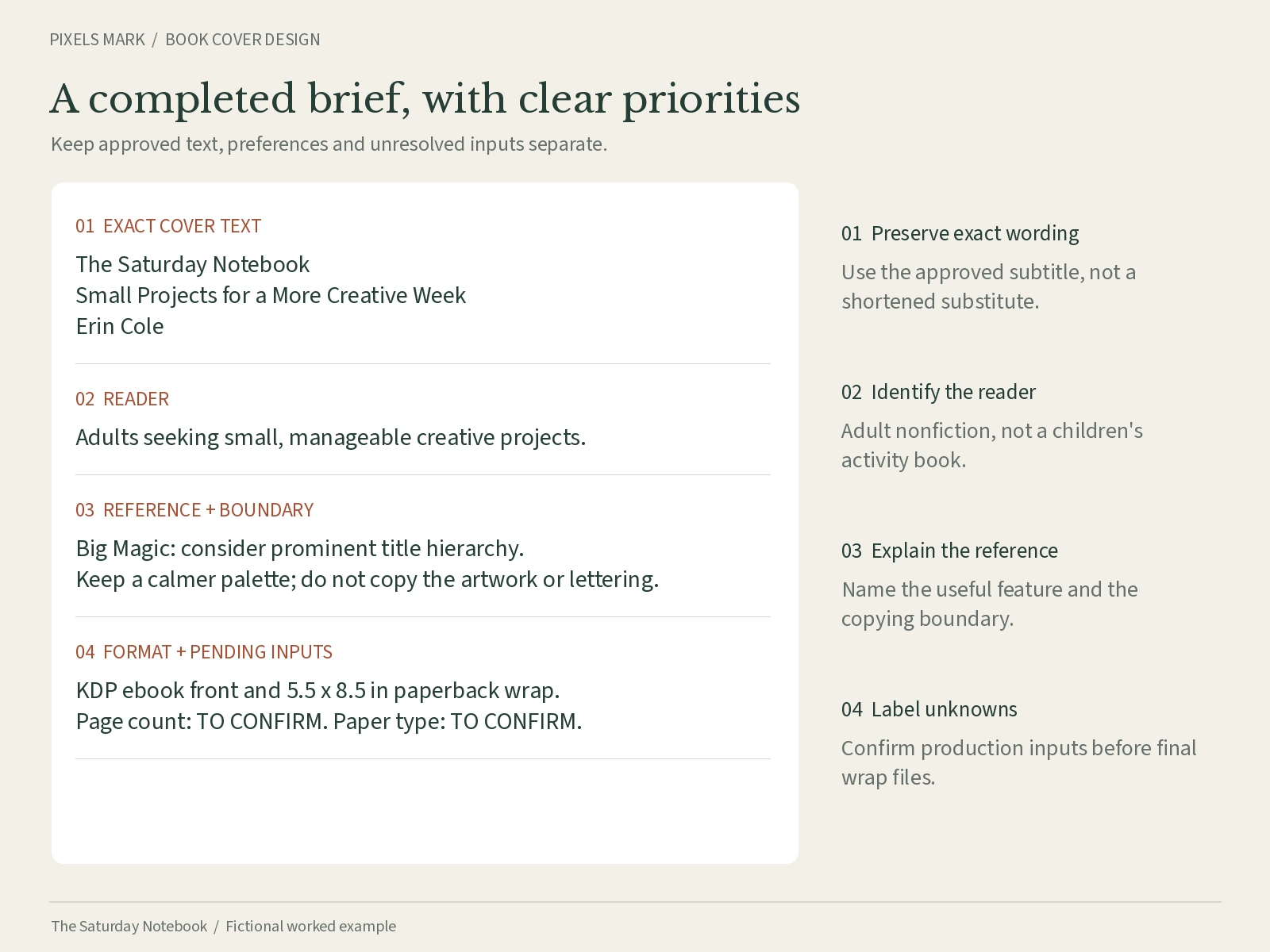
| Field | Detail |
|---|---|
| Title | The Saturday Notebook |
| Subtitle | Small Projects for a More Creative Week |
| Author name | Erin Cole |
| Series | None |
| Cover text status | Title and author name approved. Subtitle approved; no changes anticipated. |
| Genre / subgenre | Adult nonfiction / creative practice and self-development |
| Reader | Adults who want manageable creative habits without a large time commitment. Not positioned as therapy or medical guidance. |
| Book summary | Short weekly projects that build a creative practice in under an hour. Practical and encouraging in tone. |
| Cover must communicate | Approachable and practical. Calm rather than aspirational. Should not read as a children's activity book or a self-help title with clinical language. |
| Mandatory elements | Title, subtitle and author name exactly as above. No photograph of the author required at this stage. |
| Visual preferences | Hand-drawn or semi-illustrated feel. Warm, muted palette. Open to designer's interpretation on specific elements. |
| Reference covers | Big Magic, Elizabeth Gilbert, Riverhead Books, 2015, designed by Helen Yentus. Relevant feature: prominent title hierarchy with high visual energy. Boundary: do not copy its palette, lettering technique or illustrative artwork; this brief calls for a calmer visual direction. |
| Format 1: Ebook | Front cover only. Intended for Kindle Direct Publishing (KDP). Exact pixel dimensions to be confirmed against current KDP requirements. |
| Format 2: Paperback | Full print wrap (front, spine, back). Trim size: 5.5 x 8.5 in. Binding: perfect bound. Paper/interior: to confirm (affects spine width calculation). Final page count: to confirm. Spine width: calculated from printer template once page count and paper type are confirmed. |
| Back cover copy | Draft in progress. Will supply before print-wrap design begins. |
| Budget | To discuss |
| Timeline | To discuss |
| Concepts | To agree with designer |
| Revision rounds | To agree with designer |
| Editable source files | To clarify: required or not, and at what cost |
| Stock and font permissions | To confirm: which assets are included and what licences apply |
Brief-to-design decision trace
The table below shows how specific brief inputs suggest design decisions and what the author and designer each need to check. These are proposed working decisions for a fictional project, not measured reader outcomes.
| Brief input | Design implication | What to check |
|---|---|---|
| Long subtitle | Needs a distinct type size and line, not run together with the title | Is the exact subtitle wording retained? Is it readable in a composed preview at the intended display size? |
| Practical nonfiction for adults | Typography and illustration should read as adult content; avoid elements that signal a children's activity format | Does the concept feel appropriate for the stated reader without being severe? |
| Hand-drawn or illustrated feel | Illustration style to be explored in concept; will affect file format and asset licensing | Are the illustration assets licensable for commercial print and ebook use? |
| Paper type and interior: pending | Spine width cannot be calculated until page count and paper type are confirmed | When will the final page count and paper choice be available, and who supplies the print template? |
| Back cover copy: draft in progress | Concept work can proceed on the front cover; full wrap requires final back text | Who confirms when back copy is ready? What happens to the timeline if it arrives late? |
Pending inputs register
Some information is needed to explore concepts; other information is only needed before production files are finalised. The designer will confirm which inputs they need at each stage.
| Input | Current status | Who confirms it | Needed before which stage |
|---|---|---|---|
| Final page count | Pending (manuscript in revision) | Author supplies; printer calculates spine | Print-wrap production files |
| Paper type / interior colour | To confirm | Author and printer | Spine width calculation; print-wrap production files |
| Binding type | Perfect bound (confirmed) | Author | Flagged in brief; no further action needed at concept stage |
| Spine width | Cannot calculate without page count and paper type | Printer template or KDP calculator | Print-wrap production files |
| Back cover copy | Draft in progress | Author | Full-wrap design (not concept stage) |
| Budget | To discuss | Author and designer agree | Before work begins |
| Agreed revision rounds | To discuss | Designer's standard terms or agreed contract | Before work begins |
| Source file inclusion | To clarify | Designer's terms | Before work begins |
| Stock / illustration licences | To confirm per asset | Designer confirms which assets and what licence applies | Before final delivery |
If you are ready to work with a designer and want to discuss your brief, the Pixels Mark book cover design service follows a brief-led process. For authors who prefer to create a cover themselves, the book cover maker is available as a DIY option.
Ebook versus paperback versus hardcover: what changes
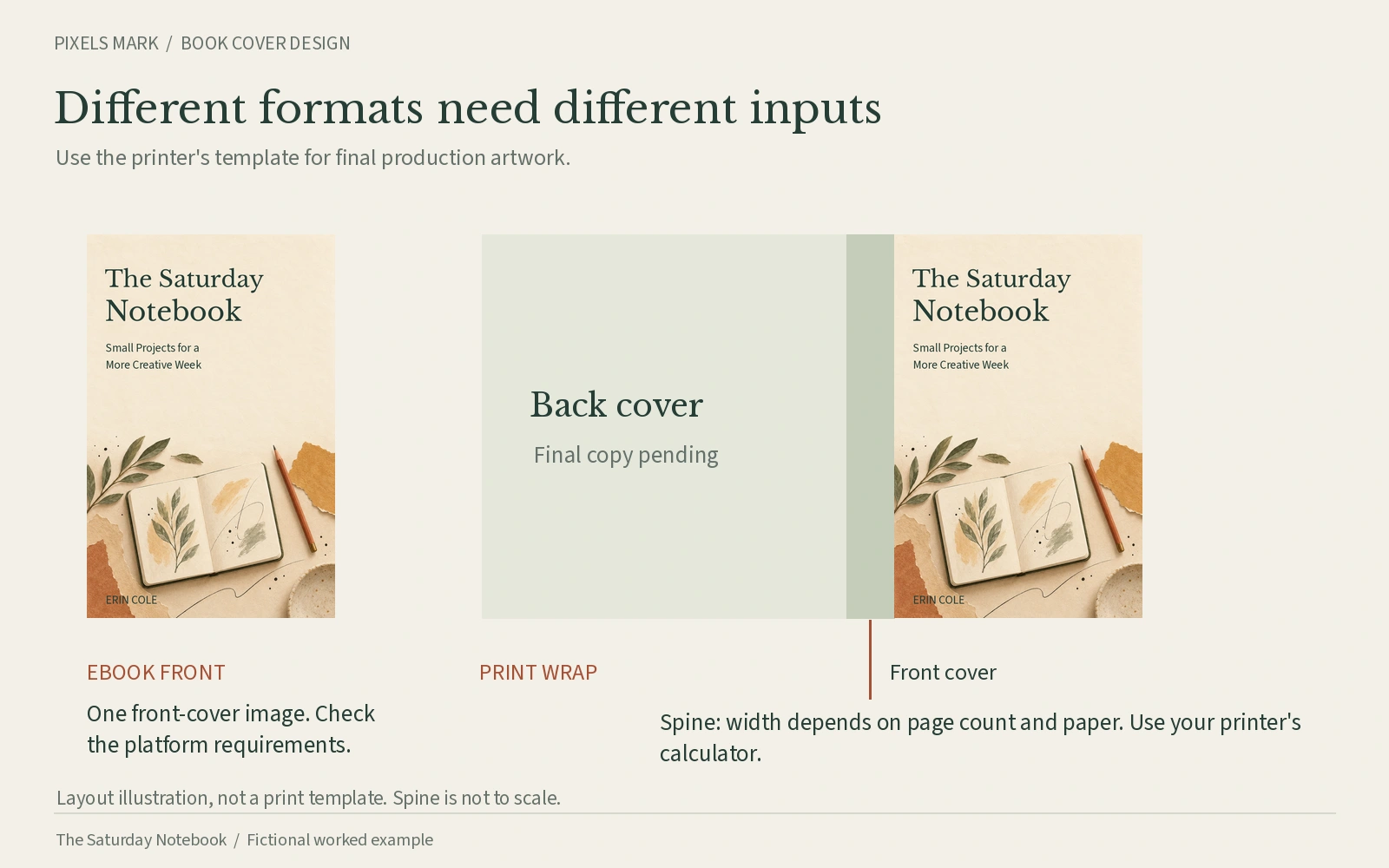
The format you are publishing in affects what your designer needs to produce, and those requirements differ by platform. For ebooks on KDP, the cover is a front image only. Current dimensions and format guidance are available directly from KDP. For paperback and hardcover, the designer needs a full print wrap, which requires a trim size, a binding type, a paper and interior specification, a final page count, and a spine width calculated from the printer's template.
Do not mix ebook image requirements with print-wrap specifications. If you are publishing on IngramSpark as well as KDP, confirm the requirements for each platform separately. Both publish official cover templates and calculators; use those rather than relying on a third-party formula. See the sources at the end of this article for direct links to the relevant KDP and IngramSpark tools.
For a paperback, note whether you want a full wrap from the start or a front cover first. Either approach is workable, but the designer needs to know so they set up the file correctly. The spine width cannot be finalised until the page count and paper type are confirmed; a placeholder spine can be used for concept review, with the final measurement supplied before production files are prepared.
Scope and permissions
Before the project begins, confirm the following with your designer. These are not details to sort out after the work is delivered.
- Front cover only, or full print wrap including spine and back?
- Which formats and platform adaptations are included?
- How many initial concepts and revision rounds?
- Are editable source files included, and in which applications?
- Which stock images and fonts are used, and what do the licences permit?
- Who is responsible for the final production check before uploading?
- What happens if the page count, paper type or scope changes after work begins?
Receiving editable source files does not automatically transfer ownership of third-party fonts or images. The licence that covers the designer's use may not extend to yours. Confirm what is included and what you are permitted to do with it. This is a practical question, not legal advice; your designer or the relevant licence terms are the right sources to consult.
Round-one feedback: how to respond to a concept
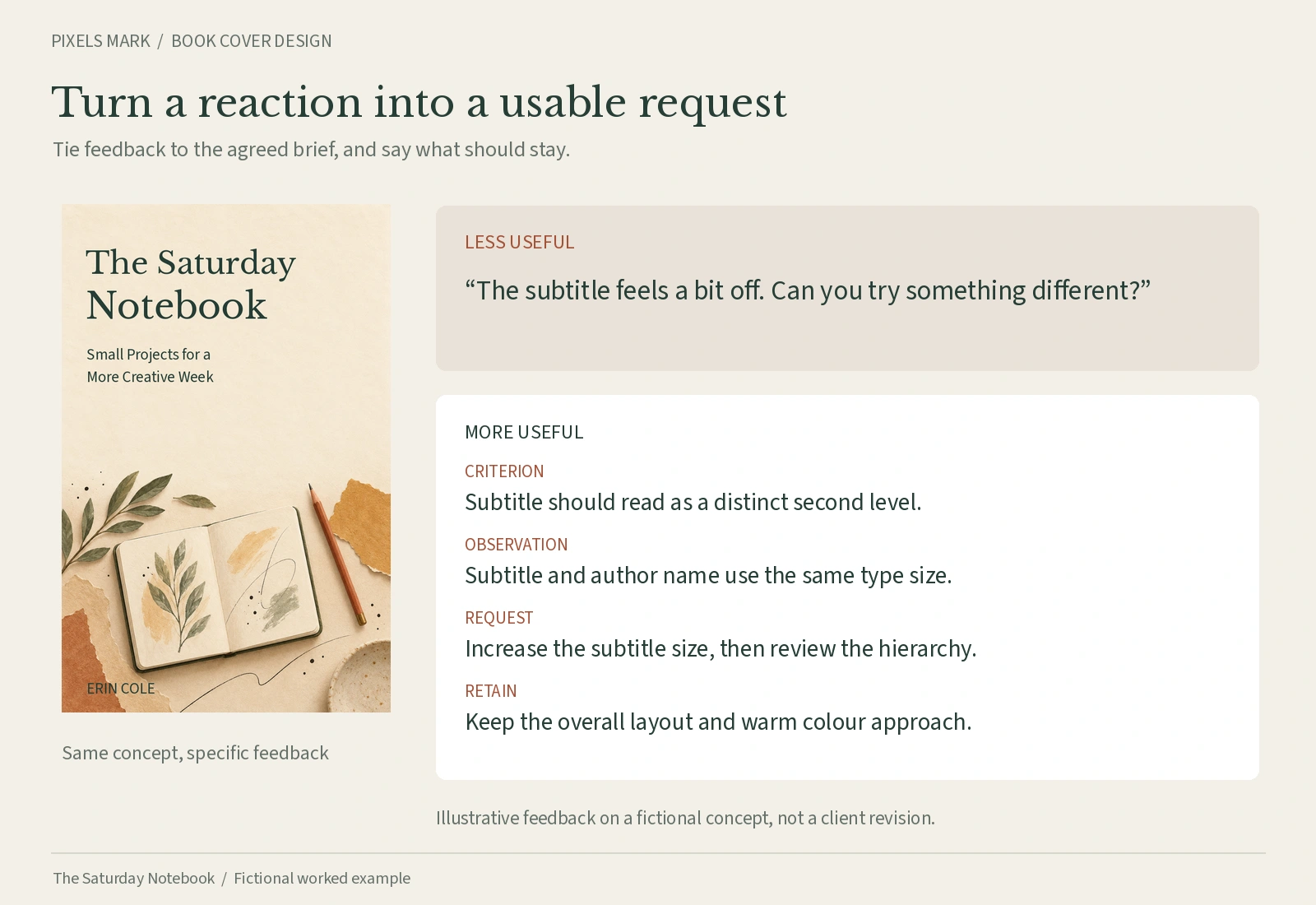
Useful feedback refers back to the brief. If the designer has met an agreed requirement, say so. If something does not match what you asked for, identify the criterion and the observation before requesting a change. Vague feedback produces revised work that drifts further from the brief rather than closer to it.
The following example demonstrates criterion-based feedback on a fictional cover concept.
| Agreed criterion | Observed issue | Specific request | What to retain |
|---|---|---|---|
| Subtitle to be set at a distinct size, clearly readable | In this hypothetical concept, the subtitle appears at the same type size as the author name and becomes difficult to separate at a glance | Please increase the subtitle size so it reads as a second level, clearly below the title but above the author name | The overall layout and colour approach are working well and should be kept |
One well-explained request is more useful than a list of instinctive reactions. Note what is working so the designer knows what to keep.
Copy the blank brief
Copy the template into your document, then fill in your answers. Mark anything unknown as ‘To confirm’.
| Field | Your answer |
|---|---|
| Title | |
| Subtitle | |
| Author name | |
| Series (if any) | |
| Cover text status | Approved / Approved with possible changes to [field] / To confirm |
| Genre / subgenre | |
| Reader | |
| Book summary (2 to 3 sentences) | |
| What the cover must communicate | |
| Mandatory elements | |
| Visual preferences (optional) | |
| Reference 1: title, author, publisher, year, specific feature, boundary | |
| Reference 2: title, author, publisher, year, specific feature, boundary | |
| Reference 3 (optional) | |
| Format: ebook | Platform: | Dimensions: (check current platform requirements) |
| Format: paperback / hardcover | Trim: | Binding: | Paper / interior: | Page count: | Spine: (to calculate) | Platform: |
| Back cover copy | Ready / Draft / To supply by [date] |
| Budget | |
| Timeline | |
| Concepts | |
| Revision rounds | |
| Editable source files | Required / Not required / To clarify |
| Stock and font licences | To confirm with designer |
| Production check responsibility |
Final sending checklist
- Approved cover text confirmed; any pending wording flagged
- Reader and genre described
- Each reference named with a specific feature and a boundary
- Formats and publishing platforms listed
- Pending inputs labelled as pending, not left blank
- Paper type and binding noted or flagged as to confirm
- Budget and timeline open for discussion, not assumed
- Scope questions noted for first conversation with designer
For more on what a book cover project typically costs and what affects the price, see the Pixels Mark guide to book cover design cost.
Sources and Methodology
- KDP ebook cover guidance. Checked October 2026. Platform specifications change; verify current requirements before quoting dimensions or file formats.
- KDP paperback cover setup. Checked October 2026.
- KDP print cover calculator and templates. Checked October 2026. Use the official calculator for spine width.
- IngramSpark file requirements. Checked October 2026. Requirements differ from KDP; confirm separately for each platform.
- IngramSpark cover template generator. Checked October 2026.
- Big Magic cover design: Helen Yentus, Publishers Weekly, September 2015. Source for the cutout letter and Holi powder technique described in the reference cover example. Checked October 2026.
- The Saturday Notebook, subtitle Small Projects for a More Creative Week, by Erin Cole: entirely fictional. Used consistently as a worked example throughout. No client approval, reader study, print acceptance or sales outcome is implied.
- Proposed design decisions in the decision trace are illustrative; they are not measured outcomes or reader research.