
Author
Pixels Mark
Release
Intensity
11 MIN READ
Quick answer: A children's book cover works when the main character, title and palette read clearly at thumbnail size. The decisions that matter most are how close the character is to the viewer, how much scene surrounds them, and whether the title has enough contrast to stay legible when the cover is displayed small. This article walks through three fictional briefs to show how those decisions play out in practice.
A children's book cover communicates what the story feels like while holding the title and author name in a way that works at thumbnail size as well as on a shelf. Getting that balance right involves decisions about colour, typography, character placement and how much of the scene to show. This article works through three fictional briefs to make those decisions concrete.
What Makes a Children's Book Cover Work
Before a child or parent reads the title, the cover's colour and main image form an impression. A pale, open background reads differently from a dense woodland scene, even when the subject matter is similar. Typography carries tone: a rounded, informal font can suggest play and lightness for one brief, while a condensed serif might suit a story calling for tradition or quiet adventure. Which approach works depends on the illustration style and the story's specific mood rather than on a fixed rule.
The decisions that shape most cover design briefs include palette, composition and typeface. Each affects how the others read, which is why a palette change often requires revisiting the title colour and character weight at the same time.
How to Assess a Cover at Small Sizes
Online retailers and discovery platforms display book covers at reduced sizes. At small sizes, fine detail disappears and the overall shape, colour contrast and title weight carry the work. Stepping back from a full-size proof, or viewing it reduced on screen, lets you check whether the title reads and the main character stays distinct from the background.
When checking your own cover, reduce the complete design on screen and assess whether the title and main subject remain clear. This practical check is separate from the required upload dimensions. KDP's current ideal for an ebook cover image is 1600 x 2560 pixels. A KDP paperback print cover requires a complete wrap file that includes the spine and back cover; a front-only concept is a separate, earlier-stage deliverable. The correct wrap dimensions depend on your book's trim size and page count, which you can generate using the KDP Cover Calculator. Other retailers publish their own specifications.
Three Worked Examples
Each example describes a fictional brief, then shows two cover directions for it. The alternative is on the left; the chosen direction is on the right. In both cases, the alternative is a credible option that could suit a different brief. Each comparison involves changes to several design variables together, not a controlled test of any single element.
Example 1: Luna and the Lost Light
Brief: a picture book featuring a young fox who carries a glowing seed through a moonlit woodland. The author wanted the cover to feel magical and warm, with a character expression that reads clearly at small sizes alongside a sense of the nighttime setting.
The alternative direction (left) places the fox in a detailed nighttime forest with a waterfall, multiple woodland animals and a full moon above the canopy. The scene rewards close inspection. The title is set in an off-white serif against the dark ground.
The chosen direction (right) brings the fox close to the frame against a pale, near-white background with soft foliage. A dark navy title sits clearly against the light ground. The character's expression and the glowing seed become the two focal points of the composition.
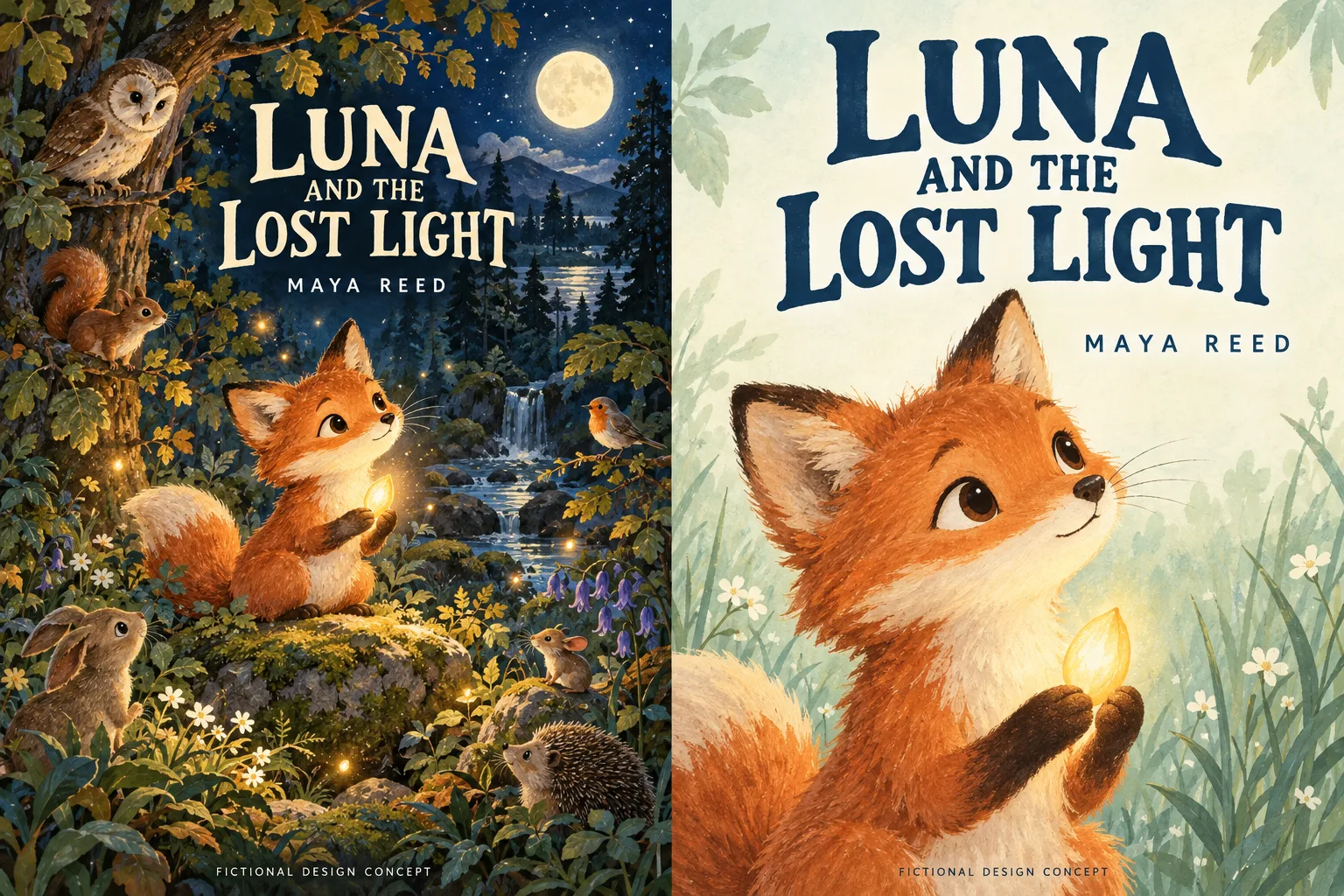
Left: woodland setting. Right: fox and seed given greater prominence.
| Element | Alternative | Selected |
|---|---|---|
| Background | Deep blue-green nighttime forest | Pale cream with soft-focus foliage |
| Character placement | Mid-scene among other animals | Large, close to viewer, filling the lower frame |
| Title treatment | Off-white serif on dark ground | Dark navy serif on pale ground |
| Small-size impression | Rich scene; fine detail compresses at reduced sizes | Character face and title stay distinct at reduced sizes |
| Interior continuity | Suggests detailed woodland spreads throughout | Character design and palette could carry through interior pages |
Example 2: Pip Finds a Red Boot
Brief: an early reader featuring a puppy who discovers a red wellington boot in a garden. The author wanted bright colours, a cheerful character expression and a composition that keeps the title and character readable at online display sizes.
The alternative direction (left) sets the scene in a full garden: a fence, watering can, pot plant, ball, rope toy, toy truck, butterflies and a sunflower share the frame with the puppy. The palette is warm and saturated throughout.
The chosen direction (right) removes most of the background props. The puppy engages directly with the red boot on a simple lawn with a few flowers. The title uses a rounded sans-serif in dark green. With fewer competing shapes, the puppy and boot read as a clear focal pair at reduced sizes.
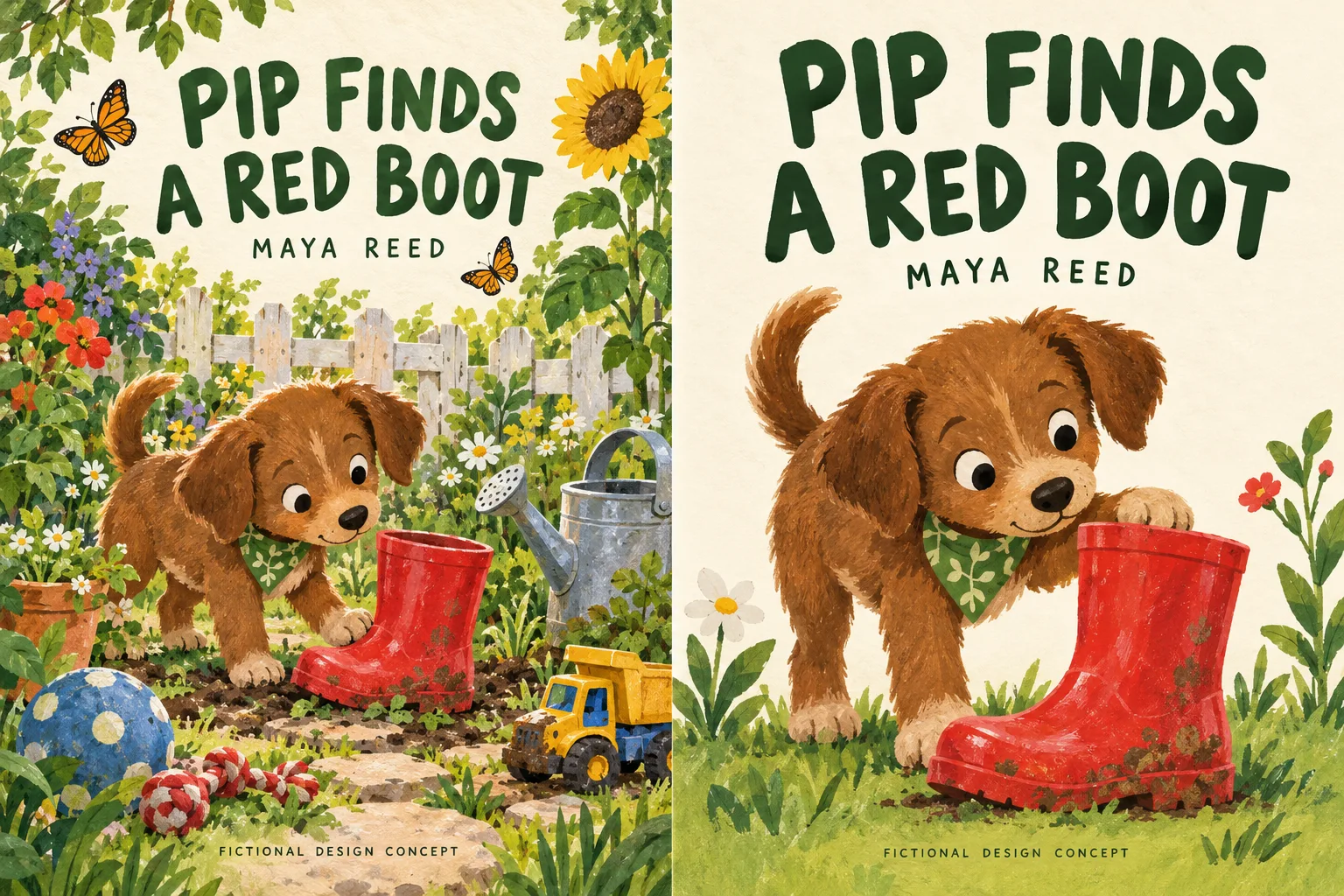
Left: detailed garden. Right: puppy and red boot as the focal pair.
| Element | Alternative | Selected |
|---|---|---|
| Background | Full garden; fence, props, butterflies, sunflower | Simple lawn, minimal props |
| Character action | Puppy approaching boot from the side | Puppy actively engaging with boot |
| Title treatment | Rounded sans-serif sharing space with decorative elements | Rounded sans-serif in dark green with more breathing room |
| Small-size impression | Cheerful and detailed; props compete at reduced sizes | Puppy and boot read as a single clear focal pair |
| Interior continuity | Suggests richly propped garden spreads throughout | Character style and colour palette suited to early-reader pages |
Example 3: The Mystery at Moonbridge Station
Brief: a middle-grade mystery in which a group of friends investigate the disappearance of the hands of the station clock at a Victorian coastal railway station. The author wanted a cover suggesting atmosphere and intrigue without revealing plot details, in a style reminiscent of classic illustrated adventure stories.
The alternative direction (left) presents a wide panoramic view from an elevated vantage point, with the coastal railway, sea and lighthouse visible in the distance. Three children and a cat are seen from behind in the foreground, taking in the scene.
The chosen direction (right) moves closer to the station entrance, framing a large ornate clock above a lit arch. Two of the children approach in silhouette from the foreground. The nighttime blue palette and warm amber accent from the lit interior create the atmospheric contrast the brief called for.
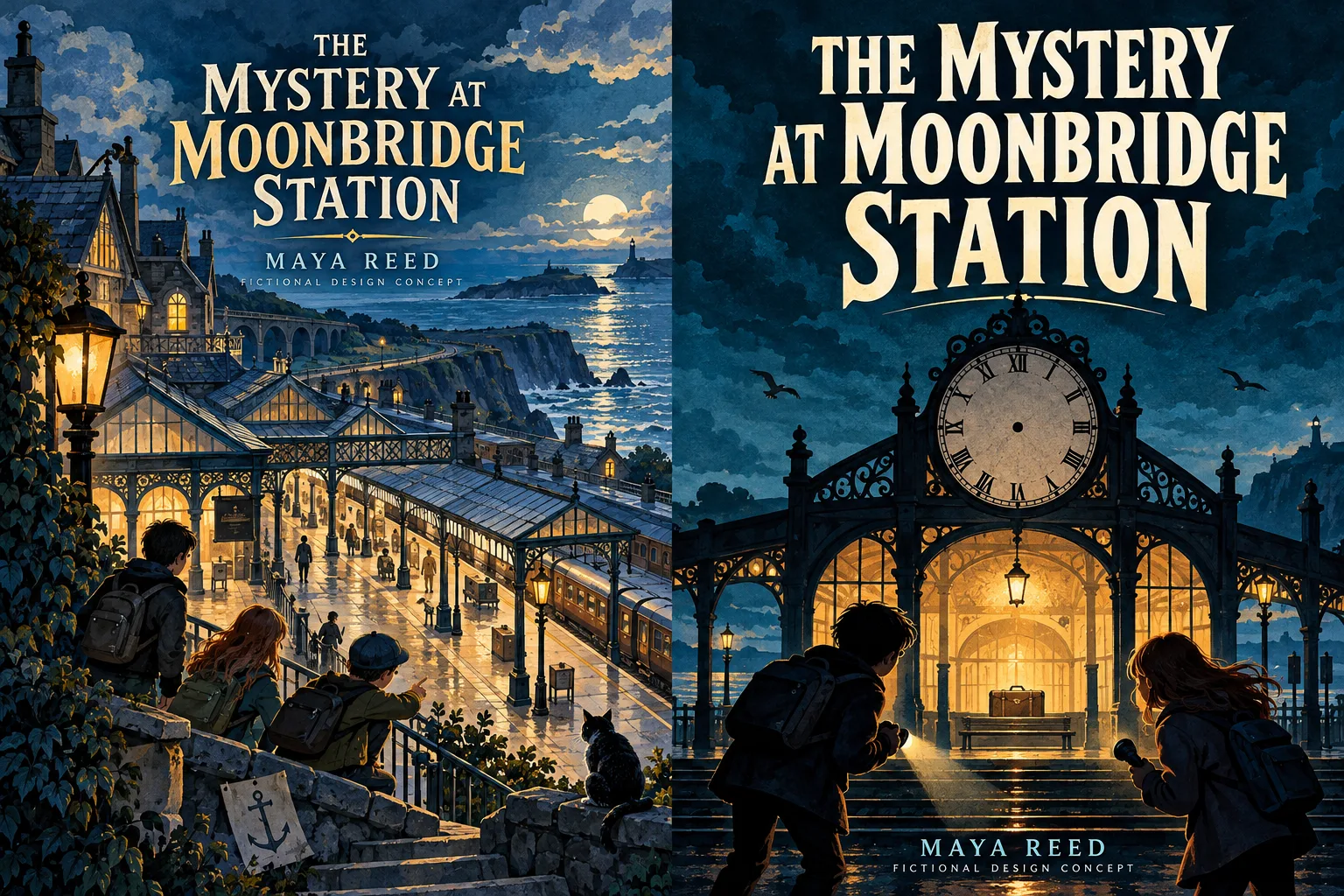
Left: wider coastal station. Right: clock and illuminated arch given greater prominence.
| Element | Alternative | Selected |
|---|---|---|
| Composition | Wide elevated panorama; station, sea and lighthouse | Close station entrance; arch and clock as focal architecture |
| Figures | Three children and a cat from behind, mid-distance | Two children silhouetted approaching in foreground |
| Title treatment | Cream serif above the panoramic scene | Bold display serif with slight arch above the entrance |
| Atmosphere | Open adventure; coastal geography as the setting | Mystery and enclosure; warm amber against nighttime blue |
| Interior continuity | Suggests wide landscape chapter openers throughout | Character silhouettes, architectural detail and colour palette could carry through chapter illustrations |
Ready to Create Your Own Children's Book Cover?
Choose a direction for your story, then start building your cover with Pixels Mark.
Create Your Book Cover NowApplying These Ideas to Your Own Brief
The examples above each started with a tonal decision: how much atmosphere to show versus how much to prioritise clarity, and how much scene to include versus how much to focus on the character. Articulating that decision in a sentence before committing to artwork often resolves competing options faster than multiple revision rounds.
Colour palette is usually the fastest variable to test. Switching from a dark to a pale background, or swapping a warm accent for a cool one, can change the tone considerably without touching the illustration. For typography, the examples above show one approach to brief-specific choices: each title treatment was chosen to suit the mood and illustration style of that particular story. There is no single combination that works across all children's books; the right pairing depends on the brief.
Technical Considerations for Self-Publishing
If you are self-publishing through KDP or a similar platform, reviewing the ebook cover image criteria and print cover requirements before commissioning final artwork is worthwhile. KDP's current ebook ideal is 1600 x 2560 pixels. A paperback print cover requires a full wrap file sized to your spine width; the KDP Cover Calculator generates the correct dimensions once you enter your trim size and page count. A front cover concept is a useful early-stage deliverable, but it is a different thing from a print-ready wrap file.
On AI-generated artwork: KDP's content guidelines require authors to disclose AI-generated content, including cover images, during the publishing process. KDP distinguishes AI-generated content (created by an AI tool) from AI-assisted content (created by a human, with AI used to refine, check or improve work, or for brainstorming without incorporating generated output into the final piece). If your cover image was produced by an AI image generator, disclosure is required even if you subsequently made edits to the result. The design concepts in this article are not proof of commercial rights or print readiness. Other publishers have their own guidelines, which are worth checking separately.
For a broader overview of cover production, Reedsy's practical cover design guide covers brief-writing, file formats and working with designers in useful detail.
Working With a Designer
If you want to work with a designer on your children's book cover, the most useful things to bring to the first conversation are a clear sense of your story's tone and intended age range, some visual references (covers you admire, illustration styles, colour palettes) and any constraints around format or retailer. A specific brief tends to produce more useful first concepts than a general one. Once you have chosen a direction, use our book cover brief template to organise your book's reading stage, exact cover text and reference notes before speaking with a designer.
Pricing varies considerably by scope: a front cover concept is a different project from a full wrap with spine design and back cover copy placement. Before choosing a production route, it helps to compare cover design costs by format, artwork and revision scope.
Need help developing your cover direction? Discuss your story, artwork and required formats with our team.
Get Book Cover Design HelpCommon Questions
Does the cover need to match the interior illustration style?
A close match in character design, colour palette and general illustration feel helps readers recognise that cover and interior come from the same world. Differences in detail level are common: interior spreads often have more compositional breathing room than a cover. A significant shift in rendering style between cover and pages tends to read as inconsistent.
Should I use the same illustrator for cover and interior?
Using the same illustrator is the most straightforward way to maintain visual consistency. When that is not possible, giving both illustrators the same brief, palette reference and character description helps keep the two aligned.
What if the brief changes after the cover is done?
When a cover is designed before interior illustration is finalised, some revision may be needed if character design or palette decisions shift during interior work. Keeping the cover at an approved-direction stage until interior character design is locked can reduce the number of revision rounds needed.
Start With Your Cover Direction
The examples above show how much difference a set of compositional and palette decisions can make. The Pixels Mark children's book cover maker lets you work through those options quickly.
Create Your Book Cover NowSources and Methodology
The three worked examples use original fictional briefs written for this article. Each comparison shows two AI-generated design concepts produced to illustrate how specific brief decisions interact: palette, composition, character placement and typeface. The alternative and selected directions change several variables together; they are not controlled experiments isolating any single element.
The images present each alternative and selected direction together. Small-size guidance is based on editorial inspection, not a fixed-size audience test. The observations on small-size legibility and interior continuity are editorial judgements based on visual inspection of these concepts. They are not the results of reader studies, usability testing or sales data.
Technical requirements in this article refer specifically to KDP at the time of writing. Platform specifications change; check current documentation before preparing publication files for any retailer.