
Author
Pixels Mark
Release
Intensity
17 MIN READ
A favicon is the small square icon that appears in your browser tab next to your page title. It also shows up in bookmarks, browser history, mobile home screens and Google search results. Most professional websites benefit from having one. Without it, your site displays a blank or generic icon that makes it look unfinished next to every competitor who took ten minutes to set one up.
- A favicon is not the same as your logo, though it is often derived from it.
- The recommended size is 512x512 pixels as a source file, which scales down cleanly to every required size.
- PNG works for most websites. ICO provides the broadest browser compatibility. SVG is the most modern option.
- A blurry or missing favicon is almost always caused by a small source file or browser cache, not a technical error.
- Favicons do not directly improve search rankings, but they do influence how your brand appears in Google search results.
What Is a Favicon?
A favicon is a small square icon that represents your website in a browser tab. When someone has your site open alongside ten others, your favicon is the only visual identifier your page has.
The word is short for "favorite icon." The name comes from Internet Explorer, which originally used the icon in the browser Favorites panel. The format has existed since the late 1990s, but it now appears across browser tabs, bookmarks, mobile home screens, app launchers and search results.
In practical terms, a favicon is a brand asset. It is the smallest version of your visual identity and often the most repeatedly seen one. A visitor who keeps your site open in a tab for an hour sees your favicon dozens of times without consciously registering it. That repetition builds recognition.
Where Do Favicons Appear?
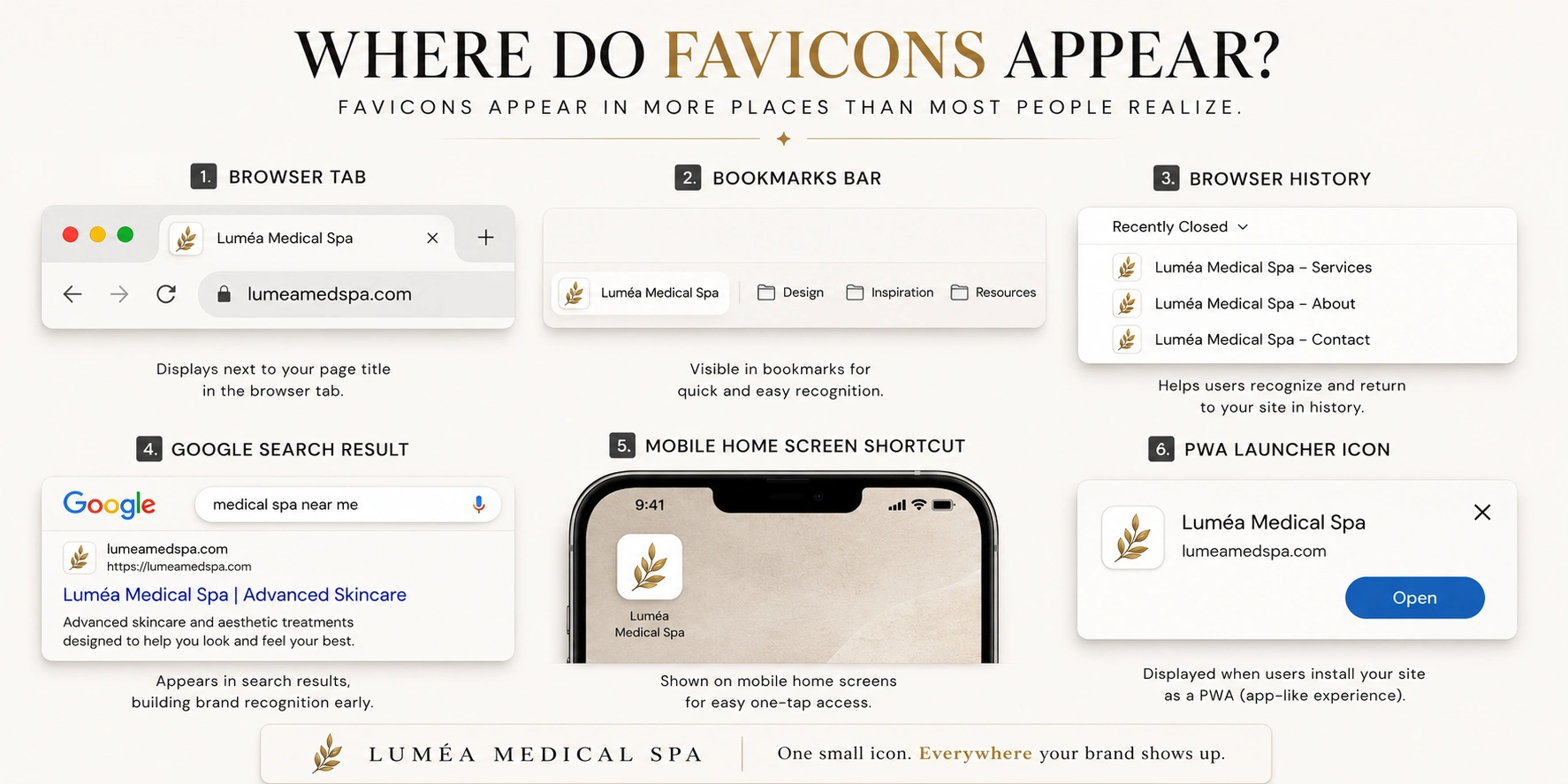
A favicon does not just live in a browser tab. Understanding every place it appears helps explain why getting it right matters.
Browser tabs. The primary location. When a visitor has multiple tabs open, your favicon is the only way they can identify your page without reading the truncated title.
Browser bookmarks. When someone saves your site, your favicon appears beside the bookmark name in every list or bar where that bookmark lives. It travels with the bookmark permanently.
Browser history. Your favicon appears alongside your URL in every browser history entry. Returning visitors navigate partly by visual recognition of these icons.
Google search results. Google may display a favicon beside your site name and URL in supported search-result layouts. Appearance is not guaranteed even when the favicon follows Google's guidelines.
Mobile home screen shortcuts. When someone saves your website to their iPhone or Android home screen, the device uses your favicon as the shortcut icon. Without a properly sized version, the device generates a screenshot thumbnail instead, which looks unpolished.
Progressive web app launchers. If your site functions as a Progressive Web App, your favicon appears in the device's app launcher. This requires specific sizes defined in a web manifest file.
Why Does a Website Need a Favicon?
The simplest answer: professionalism. A missing favicon is one of the fastest visual signals that a website has not been fully built out. It communicates the same thing as a shop with no sign above the door.
Beyond appearance, there are practical reasons.
Recognition in crowded tabs. In a crowded tab bar, a distinctive favicon helps visitors identify and return to your website more quickly.
Brand visibility in search results. Google may display your favicon alongside your site name and URL in supported search-result layouts. A well-designed icon strengthens brand recognition at the exact moment a searcher is deciding whether to click.
Mobile home screen presence. For businesses that depend on repeat visits, a home screen shortcut with a recognizable icon is a durable brand touchpoint that appears outside the browser entirely.
Completeness signal. Visitors notice missing favicons even when they cannot name what is wrong. A complete, professional website has one.
What Does "Favicon" Mean?
The word is a compound of "favorite" and "icon." Microsoft introduced the concept in Internet Explorer 5 in 1999, naming the file after the Favorites sidebar where it first appeared. The favicon.ico file placed in a website's root directory became the standard, and browsers have supported some form of the icon ever since.
The name has stayed even though the icon now appears in far more places than a Favorites panel. It is now a formal part of web standards, with browser vendors maintaining documented specifications for how favicons should be served and displayed.
What Does a Favicon Look Like?
Favicons are normally designed in a square 1:1 format. Their visual content varies by brand, but the most effective favicons share common characteristics.
Most consist of a single letter, a simple symbol, a monogram or a reduced version of a logo's primary mark. The constraint of the format forces simplicity. A favicon that displays clearly at 16x16 pixels cannot contain detailed illustrations, small text, multiple elements or fine line work. Everything reduces to essentials.
Common approaches include:
- A single bold initial in a brand color
- A simplified icon or symbol from a larger logo
- A monogram formed from two or three letters
- An abstract geometric mark
The best favicons are immediately recognizable at small sizes and distinctive enough that a returning visitor can spot them in a browser tab without reading any text. If you need design inspiration first, the PixelsMark AI Logo Maker can help you build a mark that translates well to favicon scale.
Is a Favicon the Same as a Logo?
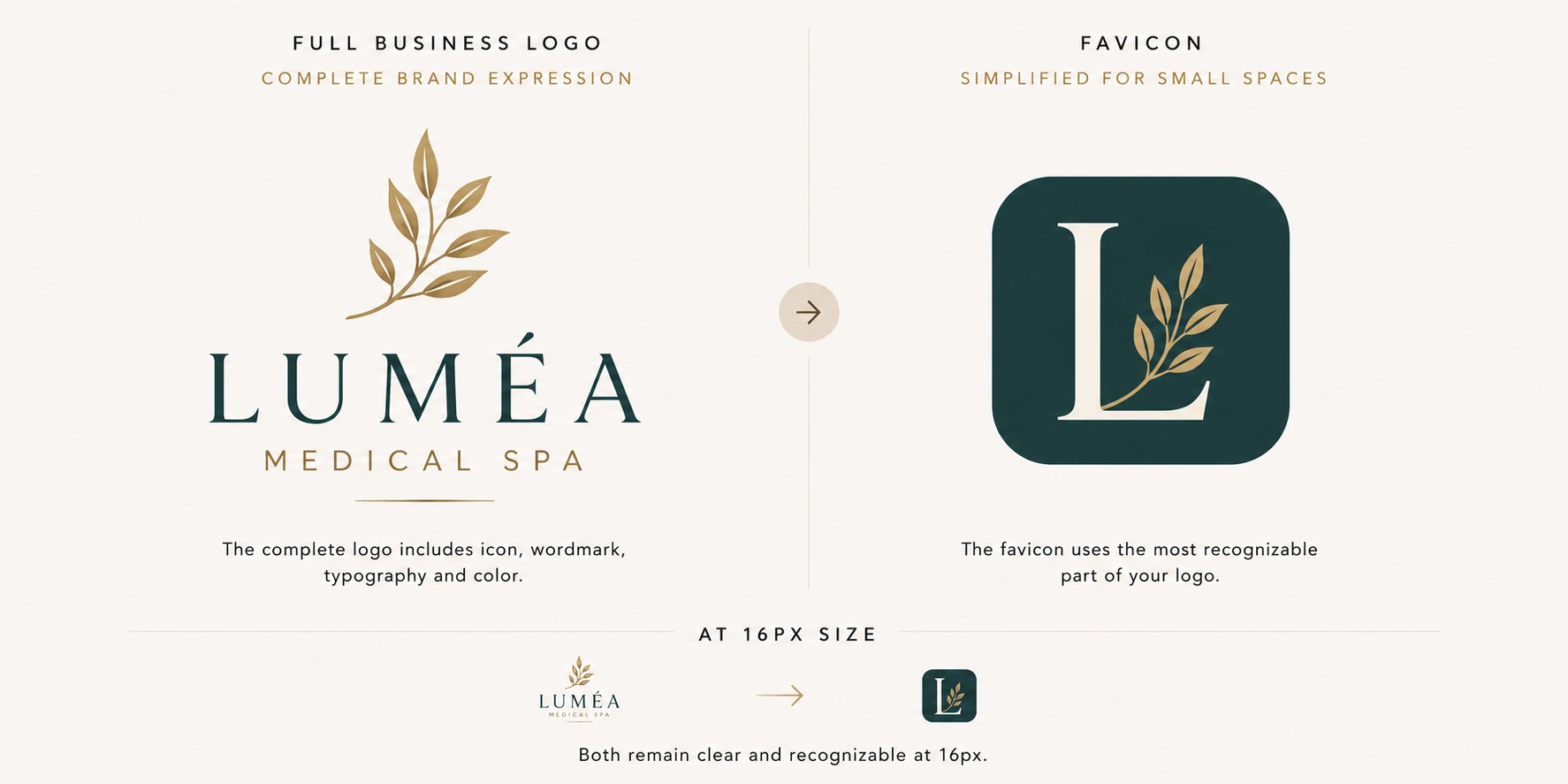
No. They are related but different things that serve different purposes at different sizes.
A logo is a complete brand identity element. It may contain a name, a tagline, multiple colors, illustrative elements, detailed typography and specific proportions that only work at medium to large sizes.
A favicon is a single small mark that represents your brand at sizes as small as 16x16 pixels. Most logos cannot simply be shrunk to that size and remain legible. The fine details, secondary elements and text that make a logo distinctive at full size all become indistinct or unreadable at favicon scale.
| Logo | Favicon | |
|---|---|---|
| Purpose | Brand identity | Browser and tab identification |
| Typical size | Flexible | 16px to 512px |
| Elements | Name, mark, color, typography | Single mark or initial |
| Complexity | Medium to high | Very low |
| File format | SVG, PNG, PDF | ICO, PNG, SVG |
The relationship between the two is best understood as follows: your logo is the source. Your favicon is a simplified version derived from the most recognizable element of that logo.
Can You Use Your Logo as a Favicon?
Sometimes, but usually with modifications.
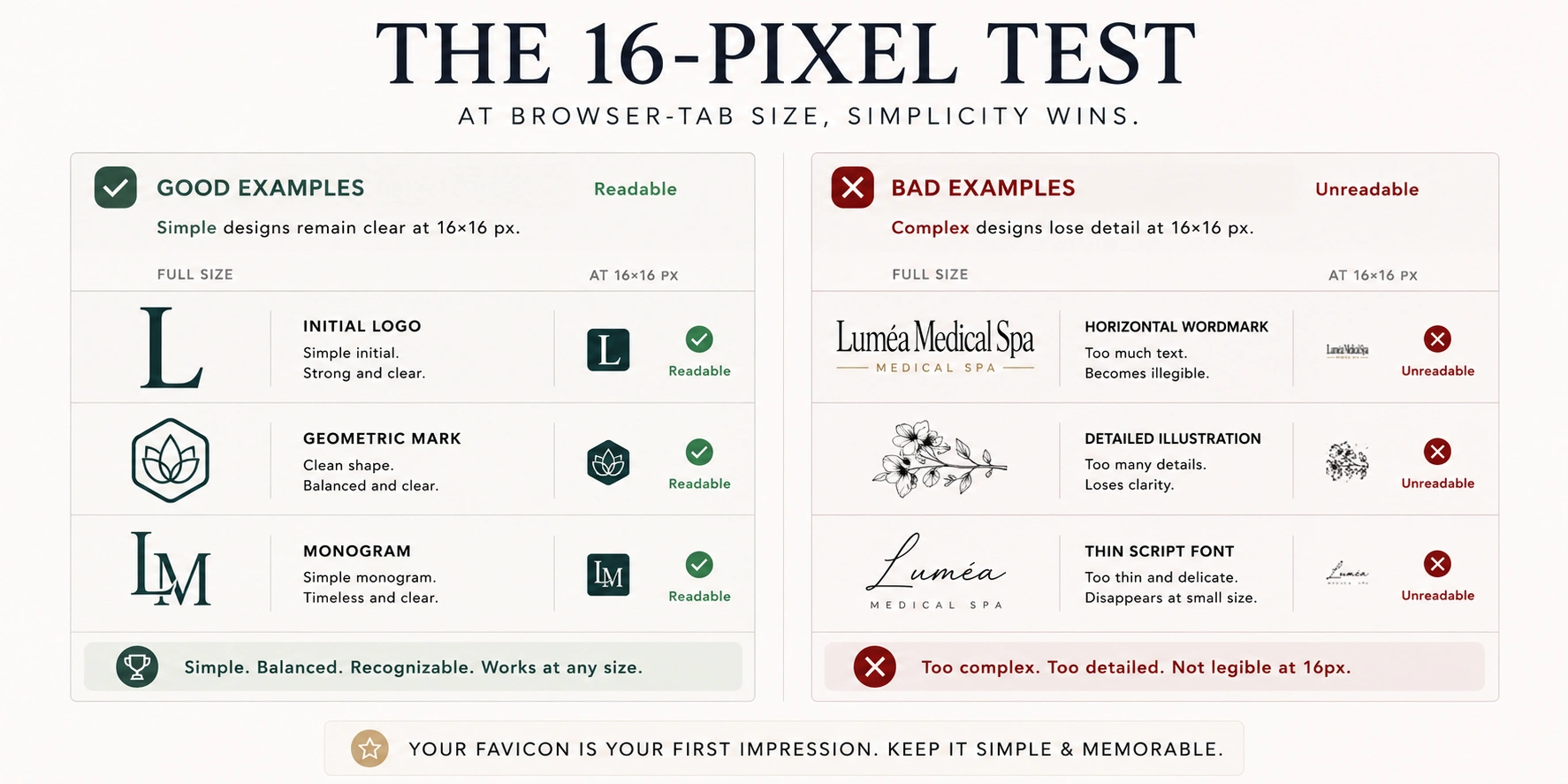
If your logo is already a simple, bold mark, such as a single initial, a geometric symbol or a compact monogram, it may work directly as a favicon with minimal adjustment. Test it by resizing it to 16x16 pixels. If it remains clearly readable and recognizable, it is ready.
If your logo is a horizontal wordmark, a detailed illustration or a complex multi-element composition, it will not work at favicon sizes without simplification. The typical solution is to extract the most recognizable single element, usually a letterform, symbol or initial, and use that as the favicon mark.
The 16-pixel test:
Resize your logo to 16x16 pixels in any image editor. If you can still tell what it is and it looks intentional rather than blurry, it is likely suitable. If it looks like a smudge or is unreadable, you need a simplified version.
This is a decision most businesses make during the logo design process, but it can be made at any point. The PixelsMark Favicon Generator lets you upload your logo and immediately preview how it will look at every relevant size before you download anything.
What Size Should a Favicon Be?
Favicon size guidance has historically been confusing because different browsers and devices use different sizes. The practical answer for most websites is simpler than the full technical picture suggests.
Start with a 512x512 source file. Upload a square PNG at 512x512 pixels. This gives any favicon generator enough resolution to produce clean outputs at every smaller size without quality loss.
The sizes you will encounter:
| Size | Use |
|---|---|
| 16x16 | Standard browser tab |
| 32x32 | Browser tab on high-resolution displays |
| 48x48 | Windows taskbar shortcut |
| 180x180 | Apple Touch Icon for iOS home screens |
| 192x192 | Android home screen and PWA launcher |
| 512x512 | PWA splash screen |
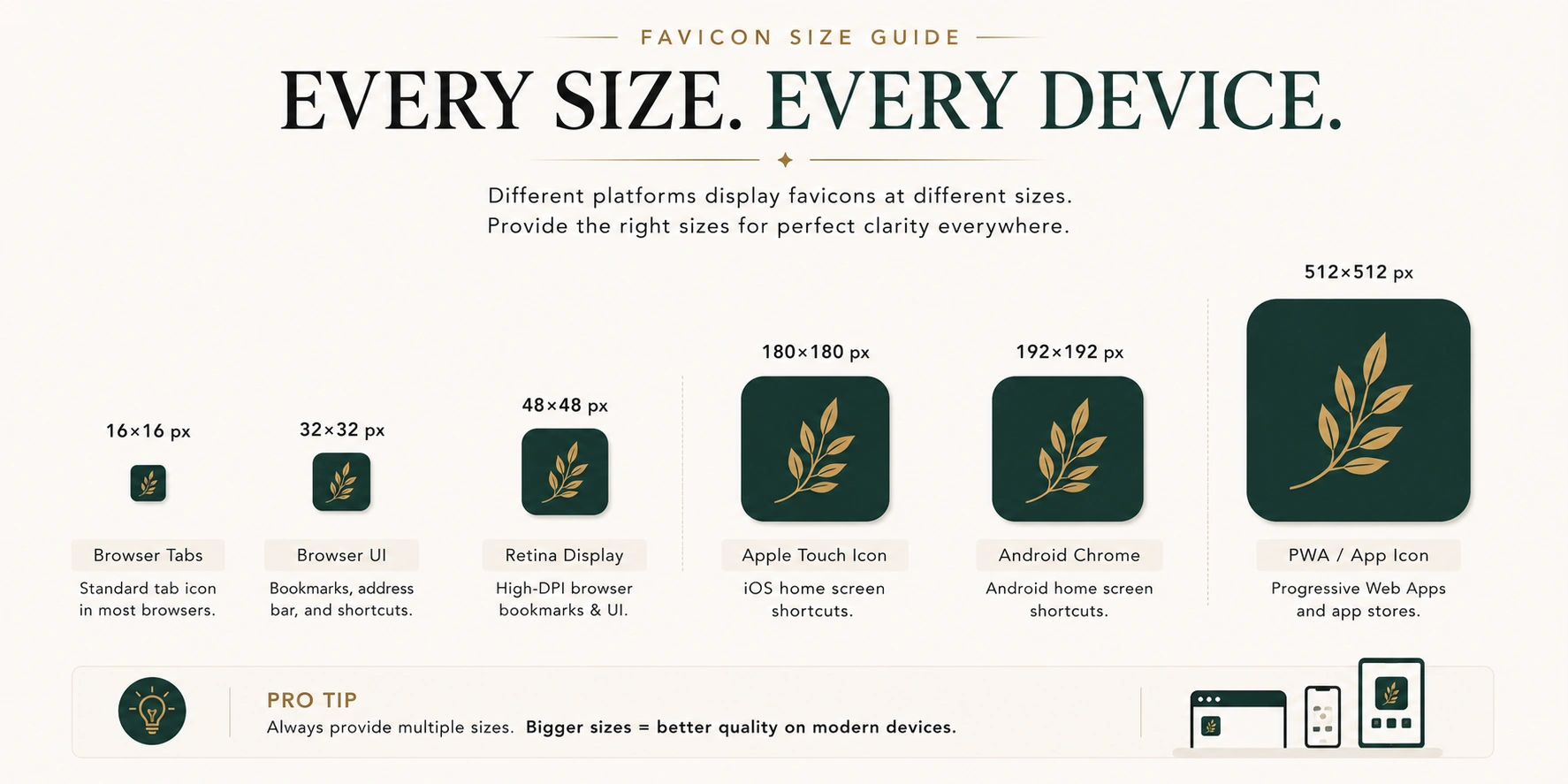
You do not need to create each size manually. A favicon generator takes your 512x512 source and produces all required sizes at once. The PixelsMark Favicon Generator does this and packages the output with the HTML code needed to reference each file correctly.
The single most important rule: always start with a source file that is at least 512x512 pixels. Upscaling a small image to larger sizes produces blurry outputs. Downscaling a large image to smaller sizes always produces sharper results.
PNG vs ICO vs SVG
Three file formats are commonly used for favicons, each serving a different purpose. For most websites, the recommended approach is to use PNG as your primary format, include an ICO file for broad compatibility, and add SVG where your platform supports it.
| Format | Browser support | Transparency | Scalability | Best use |
|---|---|---|---|---|
| ICO | All browsers including legacy | Yes | No | Universal compatibility fallback |
| PNG | All modern browsers | Yes | No | Primary format for most browsers |
| SVG | Modern browsers only | Yes | Yes | High-resolution and dark mode |
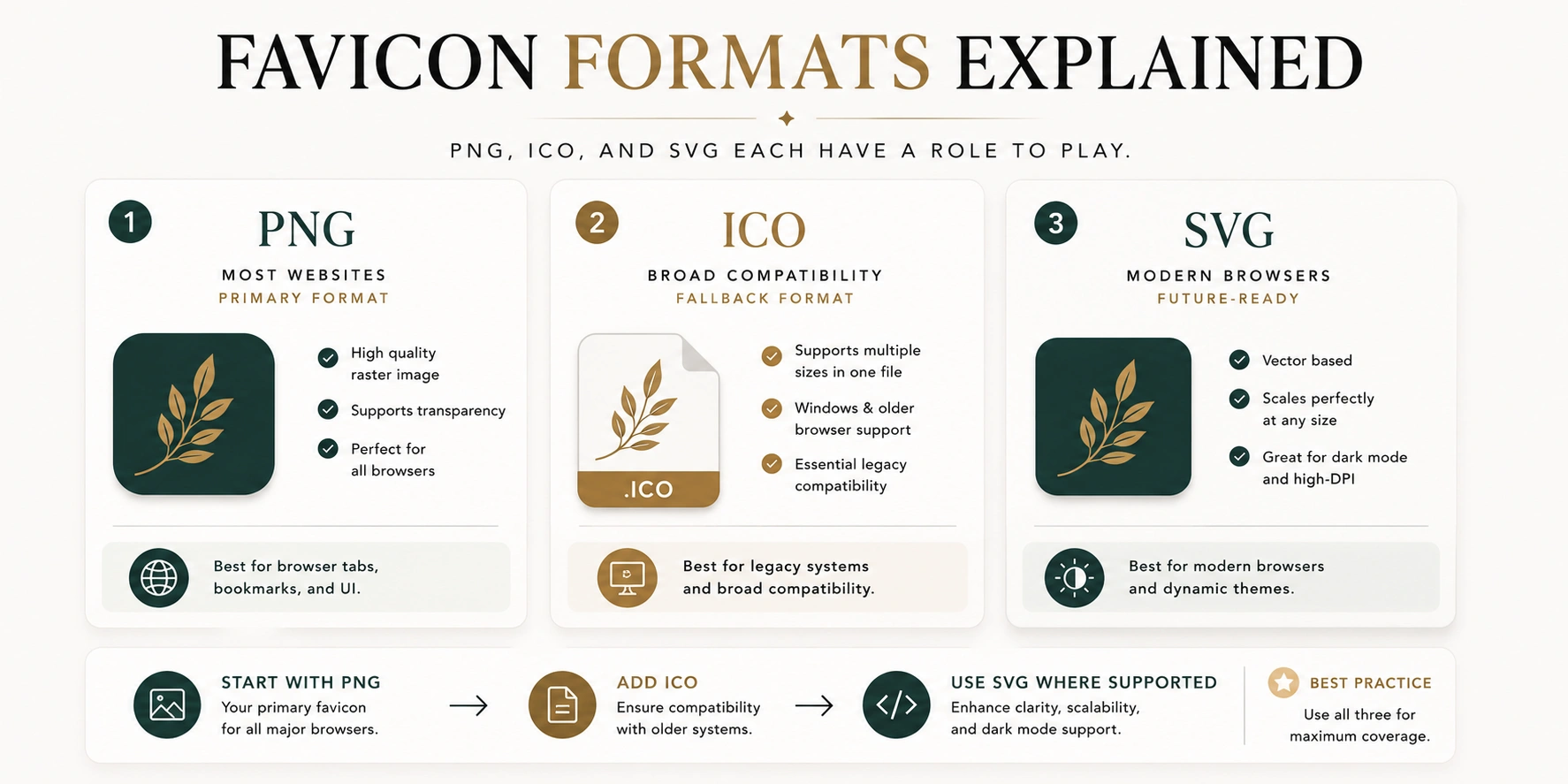
ICO is the original favicon format. It is a container file that can hold multiple sizes in a single file. Every browser recognizes it, including very old ones. It is worth including at your site root as a fallback because browsers automatically look for favicon.ico there even without a corresponding HTML tag.
PNG is the simplest and most widely compatible format. Most websites use a PNG favicon successfully across all modern browsers. It does not scale infinitely like a vector file, but at the sizes favicons are displayed, a well-exported PNG looks perfectly sharp.
SVG is a vector format that scales to any size without quality loss. It is supported by modern versions of Chrome, Firefox, Edge and Safari. An SVG favicon also supports dark mode through a CSS media query, meaning it can display a different version of the icon in dark mode without requiring a separate file. SVG is a good option if your developer or website platform supports it.
For most business owners and beginners, start with PNG. Add an ICO fallback at your site root. Include SVG if your setup supports it easily.
For a detailed comparison of when to use PNG versus SVG for any web asset, the PixelsMark PNG vs SVG vs JPG format guide covers the full decision.
When you are ready to make one, follow our step-by-step guide on how to create a favicon.
Upload your logo and download a complete favicon package in every size and format. No account required.
How Do Browsers Use Favicons?
When you visit a website, the browser looks for favicon files in two ways.
First, it checks the HTML of the page for link tags that explicitly reference favicon files. A typical set looks like this:
<link rel="icon" type="image/png" href="/favicon.png">
<link rel="apple-touch-icon" href="/apple-touch-icon.png">
Second, if no favicon is declared in the HTML, most browsers automatically request favicon.ico from the root of the domain. This is why placing an ICO file at your site root provides a reliable fallback even if your HTML is not fully configured.
Browsers cache favicons aggressively, which means they do not download them again on every page load. This is good for performance but is the reason why updating a favicon often takes time to appear, even after you have uploaded the new file.
Different platforms handle this automatically. WordPress, Shopify, Squarespace, Wix and Webflow all have built-in favicon upload settings that generate the correct HTML without requiring manual code edits.
What Makes a Good Favicon?
The qualities that make a favicon effective are almost exactly opposite to what makes a logo memorable at large sizes.
Simplicity. A single clear element reads well at 16x16 pixels. Multiple elements compete and collapse into noise.
High contrast. Your favicon appears against a browser tab that may be light or dark depending on the user's settings. A high-contrast design remains visible across both.
Distinctiveness. Your favicon should be immediately recognizable as different from the other icons in a tab bar. Generic shapes such as plain circles or generic letterforms can be confused with dozens of other sites.
Consistent brand color. Using your primary brand color helps returning visitors recognize your favicon without consciously identifying it.
Avoiding fine detail. Thin lines, small text and intricate patterns disappear at small sizes. Everything that is not essential to recognition should be removed.
A useful test: close one eye, hold your phone at arm's length and see if you can identify your favicon in a tab bar with other icons. If you can, it is doing its job.
Common Favicon Mistakes
Using a source file that is too small. Uploading a 32x32 or 64x64 image forces the generator to upscale, producing blurry outputs. Always start with at least 512x512 pixels.
Using your full horizontal logo. Wordmarks and complex logos lose legibility at favicon sizes. Use only the most reducible element.
Not providing an ICO fallback. Modern browsers handle PNG well, but legacy environments and certain tools still look for favicon.ico at the root. Including one is a simple step that improves compatibility.
Forgetting the Apple Touch Icon. Without a 180x180 PNG defined as an Apple Touch Icon, iOS devices generate a screenshot thumbnail when users save your site to their home screen.
Expecting instant updates. Browsers cache favicons. After uploading a new one, it may take hours or days to appear for existing visitors. Opening the site in a private or incognito window shows the current version immediately.
Using too many colors or gradients. Complex color treatments often look muddy at small sizes. A simple two-color treatment or single-color mark on a plain background performs better.
Why Is My Favicon Not Showing?
This is one of the most common web design questions, and it almost always has one of four causes.
Browser cache. The most frequent cause. Your browser stored the old favicon and is still serving it. Open your site in a private or incognito window. If the new favicon appears there, the issue is cache. Wait a day, or force-refresh the page by holding Shift while clicking the refresh button.
Wrong file path. The HTML references a favicon at /favicon.png but the file is actually at /images/favicon.png. Check that the file path in your HTML exactly matches where the file is stored.
Source file too small. If the favicon appears blurry rather than missing, the source image was too small and the output was upscaled. Recreate it from a 512x512 source.
Missing ICO fallback. Some environments only look for favicon.ico at the domain root. If you have only provided a PNG, try also uploading an ICO file to the root directory of your site.
Google search result not updating. Google caches favicons independently of browsers and updates them on its own schedule. There is no way to force an immediate update. After you have uploaded a new favicon and confirmed it is live, Google will typically update the search result icon within a few days to a few weeks.
Does a Favicon Help SEO?
A favicon does not directly affect your search engine ranking. No credible evidence supports the claim that having a favicon causes a page to rank higher.
What a favicon does affect is how your website appears in search results. Google may display favicons alongside your site name and URL in supported search-result layouts. Appearance is not guaranteed even when the favicon follows Google's guidelines. A recognizable, well-designed icon makes your brand more visually identifiable in a page of results. It may influence whether a returning visitor recognizes and chooses your result, but this is a brand effect rather than a ranking factor.
The honest answer: a favicon is a branding asset, not an SEO tool. It makes your site look complete and professional. That is reason enough to have one.
Frequently Asked Questions
What is a favicon used for?
A favicon identifies your website visually in browser tabs, bookmarks, browser history, mobile home screen shortcuts and Google search results. It is the smallest version of your brand identity.
What is the best size for a favicon?
Create your source file at 512x512 pixels. A favicon generator will produce all required sizes from that single source, including 16x16 for browser tabs, 180x180 for iOS and 192x192 for Android.
Does every website need a favicon?
Most professional websites benefit from having one. Without a favicon, your site displays a generic blank icon in browser tabs and search results, which can make it look incomplete.
Can I use a JPEG as a favicon?
JPEG is not recommended for favicons because it does not support transparency and can introduce compression artifacts. PNG, ICO or SVG are better choices.
Why does my favicon look blurry?
The source image was too small. The generator upscaled a low-resolution input to produce larger sizes, which creates blur. Create a new source file at 512x512 pixels and regenerate.
How do I add a favicon to WordPress?
Go to Appearance → Customize → Site Identity → Site Icon. Upload a square image at 512x512 pixels or larger. WordPress handles the resizing and HTML automatically.
How do I add a favicon to Shopify?
Go to Online Store → Themes → Customize → Theme Settings → Favicon. Upload a 32x32 PNG. Shopify handles the HTML automatically.
What is an Apple Touch Icon?
An Apple Touch Icon is a 180x180 PNG file used when someone saves your website as a shortcut on an iPhone or iPad home screen. Without it, iOS uses a screenshot of your page instead.
Is SVG better than PNG for a favicon?
SVG scales perfectly to any size and supports dark mode, but it is only supported by modern browsers. PNG is supported by all browsers and is the more reliable starting point for most websites. Including both gives you the best of both options.
Favicon Summary
- A favicon is the small square icon that appears in browser tabs, bookmarks, mobile home screens and Google search results. Most professional websites benefit from having one.
- The word comes from "favorite icon," a term from Internet Explorer 5, where the icon first appeared in the Favorites panel.
- A favicon is not the same as a logo. It is a simplified version of your most recognizable brand element, designed to be legible at 16x16 pixels.
- The recommended source file size is 512x512 pixels. Generate all required output sizes from that single file.
- PNG is the recommended starting point for most websites. ICO provides broad compatibility as a fallback. SVG is a good addition where supported.
- A missing or blurry favicon is almost always caused by a small source file, a wrong file path or browser cache, not a technical error.
- Favicons do not directly affect search rankings but Google may display them in supported search-result layouts alongside your site name and URL.
Related Articles
- How to Create a Favicon
- PNG vs SVG vs JPG Guide
- PixelsMark Favicon Generator
- PixelsMark AI Logo Maker
References
The following sources support the factual claims made in this article.
- Google Search Central — Favicon in Search
- MDN Web Docs — rel="icon"
- HTML Living Standard — Link Type: Icon
- web.dev — Image Optimization
- Apple Developer — App Icons
Upload your logo once and download a complete favicon package including ICO, PNG and SVG files in every size. No account needed. No watermarks.