
Author
Pixels Mark
Release
Intensity
14 MIN READ
A coffee shop logo appears across a range of surfaces: printed on a takeaway cup sleeve, shown as one-colour stamp artwork, scaled up to a sign above a door and reduced to a profile image no larger than a thumbnail. That range of surfaces is what makes a coffee logo decision harder than it looks on a mood board.
This guide works through four original design directions, each brief built around a different kind of business. You will see what each mark proposes to do across cups, signs and coffee bags, a separate BRIM stamp-artwork example, and where it runs into practical limits. The goal is a clear picture of the tradeoffs before you commit to artwork.
Quick note
Choose your main application first: a takeaway cup, storefront sign or coffee bag. Compare each direction at its intended size, then check a one-colour version before approving artwork.
What your coffee shop logo needs to do
A mark that looks excellent as a centred badge on a white artboard can disappear on a kraft bag, crowd a narrow sleeve or lose its detail when painted at sign scale. Designing for a single surface without checking the others is where application problems begin.
Start with the surface where your name is most likely to matter first. For a neighbourhood cafe, the takeaway cup and the sign above the door are often the highest-visibility touchpoints. For a roaster selling bags online, the bag face and a small square profile image tend to be the first things a buyer sees. Either way, the surface you prioritise should drive your type scale, mark complexity and the balance between symbol and name.
A coffee shop or cafe logo usually has two versions: a primary lockup for larger surfaces and a compact mark for small applications. These are not two different logos. They share the same name, the same type treatment and the same symbol, but one prioritises the full wordmark alongside a symbol and the other reduces to a monogram, symbol alone or shortened name.
A compact mark may use an approved colour variation from the same palette. What it should not do is introduce different letterforms, an unrelated mark or a colour that has no connection to the primary identity. That kind of inconsistency creates confusion across surfaces rather than solving a size problem.
Four coffee logo ideas with worked applications
Each direction below is an original fictional brief. The concepts show different combinations of symbol type, name length and application constraint, not a ranked list from best to worst.
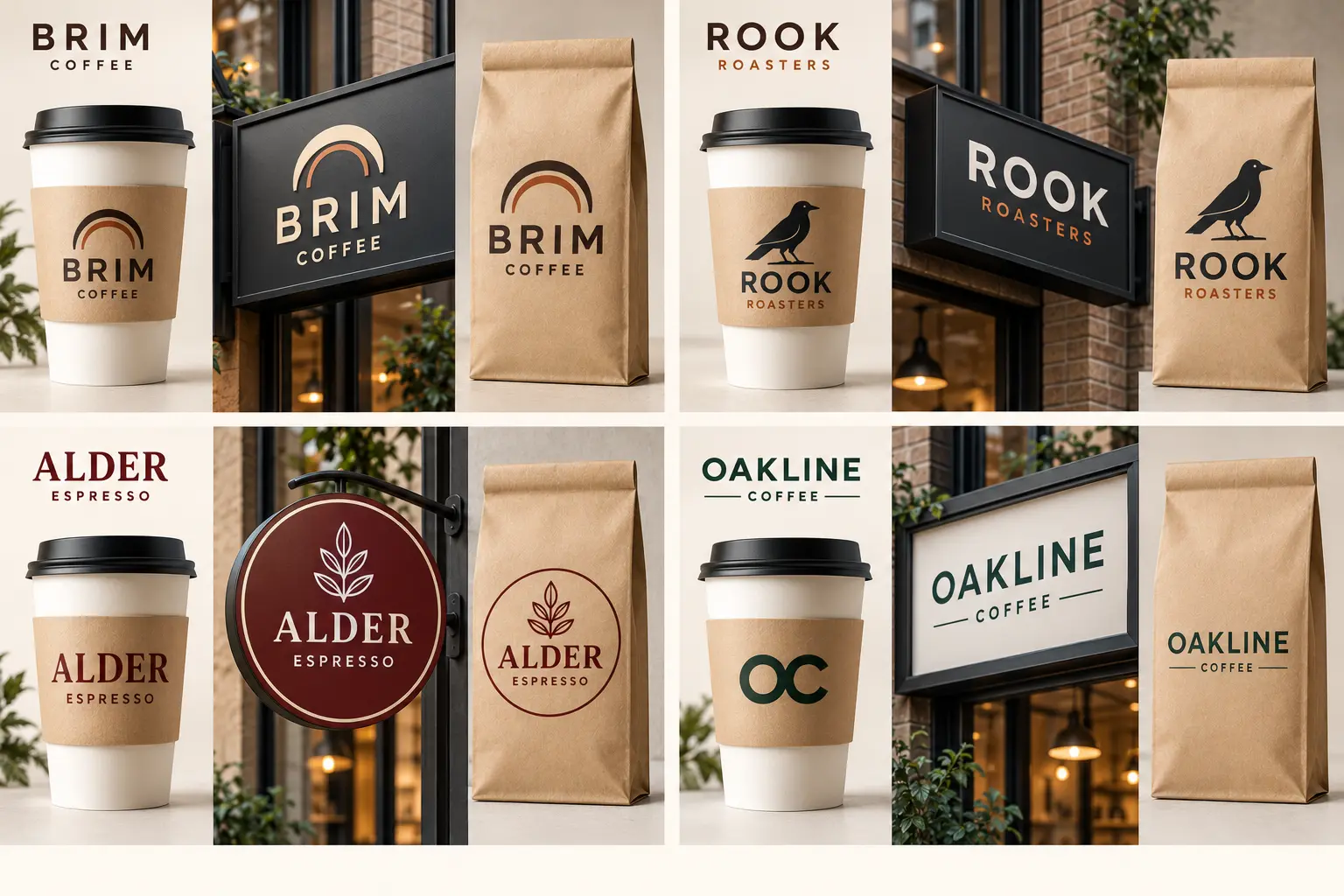
1. Neighbourhood cafe: BRIM Coffee
BRIM Coffee proposes a sans-serif wordmark paired with a double-arc symbol inspired by a cup rim. The type treatment is designed with legibility at sleeve width as the first priority, which means a moderate weight, generous letter-spacing and a prominent cap height whose print reproduction still needs checking. The cup-rim symbol is planned as a secondary element, small enough to sit beside the wordmark without competing with it.
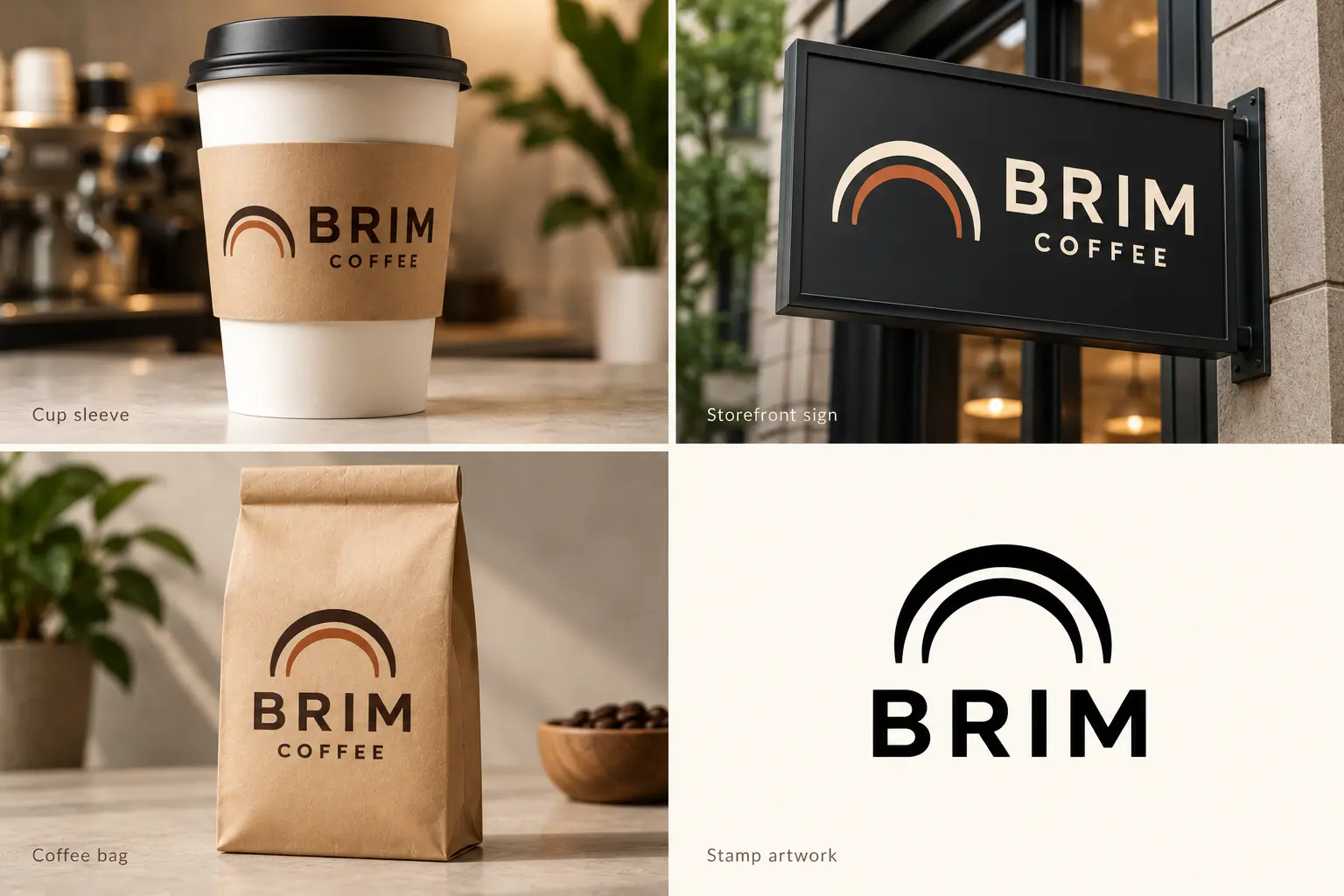
On a cup sleeve, the full wordmark and double-arc symbol can sit side by side or in a stacked arrangement, depending on the available space. The storefront sign uses the same elements at a larger scale. On the coffee bag, the double-arc symbol sits above the BRIM name, with Coffee beneath it. The one-colour stamp artwork combines the double arc with BRIM in capitals, omitting the Coffee descriptor. Its reproduction still needs testing at the intended stamp size.
In the four-direction image, BRIM uses a stacked arrangement on the cup, sign and bag. The dedicated application image also shows a side-by-side layout on the sleeve and sign. Both retain the double-arc symbol and the same brand name.
The practical limit of this direction: a cup-rim symbol is a recognisable category cue, but it is also one of the most common shapes in cafe branding. Differentiation depends on the specific proportions, weight and relationship to the type, not on the symbol concept alone.
2. Specialty roaster: ROOK Roasters
ROOK Roasters proposes a non-literal mark, a rounded bird silhouette with a pointed beak and visible legs, rather than a coffee bean or cup. A roaster selling bags online needs a mark that reads as a distinct shape at small sizes, and a literal product symbol tends to blend into the wider category. The descriptor "Roasters" is planned to sit below the primary wordmark on packaging, giving context without cluttering smaller applications.
On a bag face, the bird symbol and wordmark are planned to work as a stacked lockup. On a sign, the horizontal wordmark is intended to fill the available width. The compact version proposes the bird silhouette alone, without the wordmark. At stamp or profile-image dimensions the silhouette needs to read as a complete, recognisable shape, which means the bird form must be constructed so its outline is clear even when the interior detail is not visible.
The four-direction image uses a wordmark-only ROOK sign, while the hero includes the bird beside the name. The bird-only compact version discussed here is a proposed next step; it is not separately demonstrated in the supplied images.
Whether the silhouette holds its reading at small size depends on the final vector construction. That check belongs in the approval process, not in this brief. A bird silhouette with fine interior lines or an ambiguous outline will lose its shape before it reaches stamp dimensions.
3. Heritage espresso bar: ALDER Espresso
ALDER Espresso combines a serif wordmark and leaf motif inside a circular badge. The badge format is designed to organise multiple elements, the name, descriptor, leaf motif and enclosing circle, into a single printable unit. The badge is planned for sign and bag use. For cups and stamps, a simplified version proposes the wordmark only, without the enclosing circle or leaf motif, because the circular badge can lose interior detail at sleeve width and may require further simplification for clean stamp reproduction.
The tradeoff is explicit in this brief: the badge is intended for medium and large sizes, but the simplified wordmark-only version is needed for the smallest applications. The two versions should be designed together so the transition reads as intentional rather than like a compromise.
A serif wordmark in a badge can read as refined and settled. It can also create legibility problems at small sizes if the typeface has high contrast between thick and thin strokes. A low-contrast serif or one designed for small-size reproduction is likely to perform better across the full surface range than a high-contrast display face chosen primarily for its look on screen.
4. Contemporary takeaway: OAKLINE Coffee
OAKLINE Coffee proposes a long-name challenge. OAKLINE above a smaller Coffee descriptor, flanked by short horizontal rules, occupies considerable width, which affects how the mark fits different surfaces. On a wide storefront sign or a bag face with a generous print area, the full lockup is intended for wider applications. On a cup sleeve, where the usable print band is narrow and often curved, that same width becomes a constraint. The type scale needed to keep the name legible may leave little room for anything else.
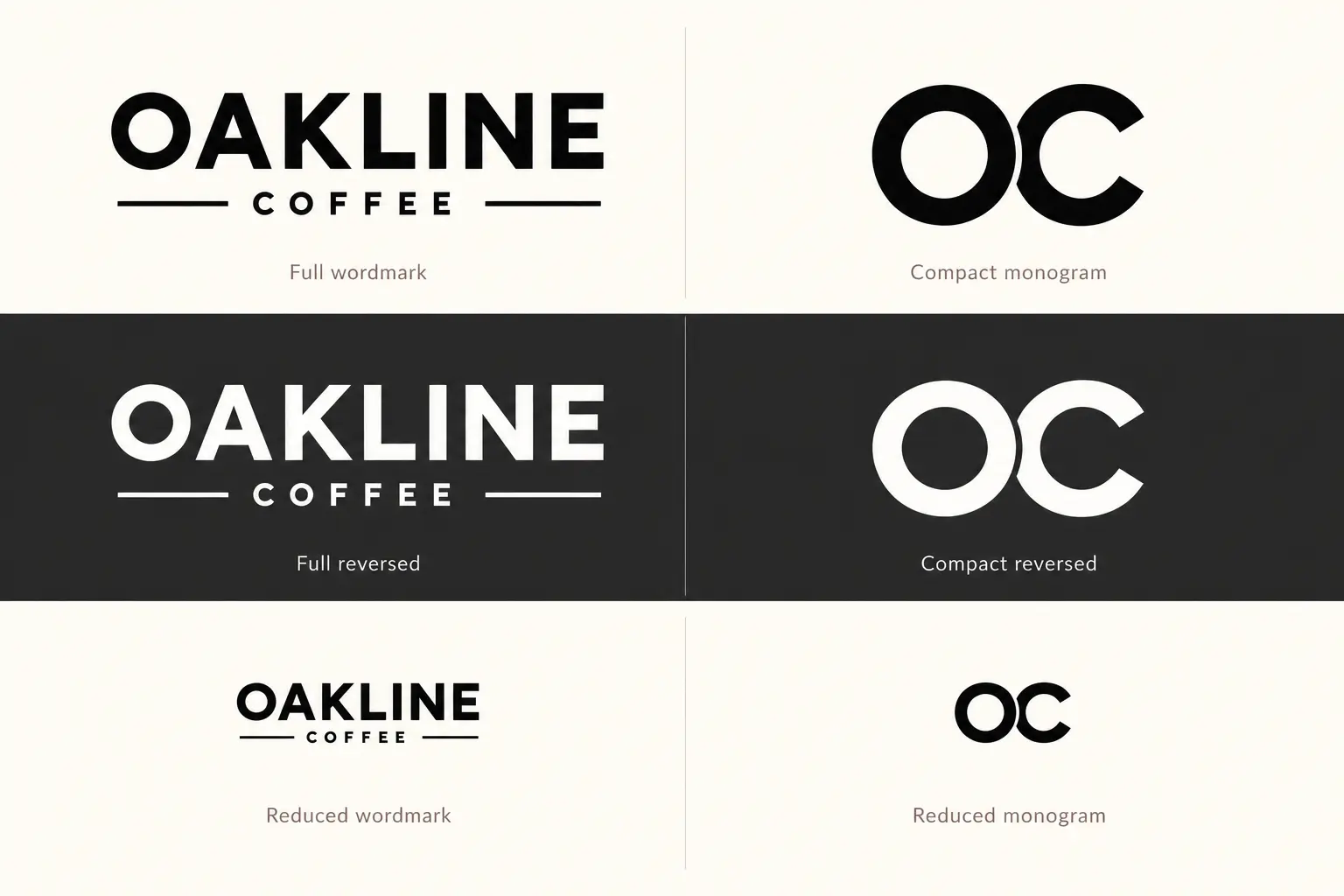
The compact version proposes a two-letter monogram, OC, treated as a simple paired letterform. For this to work, the monogram must be visually connected to the full wordmark by maintaining related letter shapes, visual weight and spacing. A monogram that looks like a separate identity, or that uses letterforms chosen independently, creates confusion rather than extending the brand across surfaces.
On a profile image, a symbol, a monogram or a short readable wordmark can each work depending on the final construction and the size at which the image is displayed. For OAKLINE, the OC monogram is the most compact option, but check its legibility at the actual pixel dimensions your platform uses before treating it as the default small-format version.
The application check for this direction should include the sign panel width before specifying which lockup is primary for that surface.
The OAKLINE comparison shows a two-line full wordmark and OC monogram in black, reversed white and reduced digital previews. These are visual comparisons, not measured platform thumbnails or physical proofs.
Comparing cups, signs, bags and stamps
Each surface in cafe branding has a specific constraint that affects which version of the logo to use and what to check before approving artwork.
| Surface | Key constraint | Suitable variation | What to inspect |
|---|---|---|---|
| Cup or sleeve | Curved surface, narrow usable print band | Full wordmark or symbol plus short name; avoid detailed badges | Legibility at actual sleeve width; logo placement relative to seam |
| Storefront sign | Viewed at distance; fabrication process affects fine detail | Full wordmark or wide horizontal lockup; avoid very thin strokes | Minimum stroke width for the sign material; scale at intended viewing distance |
| Coffee bag | Face panel width and closure area vary by supplier template | Stacked lockup or wide horizontal; check the supplier dieline | Logo fits inside the safe area; critical information not cut at seam |
| One-colour stamp | Ink spread at small size reduces fine detail | Symbol alone or short name in a clean weight; no hairlines | Review artwork at intended stamp dimensions; a digital preview is a starting point |
Supplier dielines and specifications vary by product and supplier. The noissue custom cup sleeve guide covers the product dimensions, material options and supported print processes for their cup sleeves; it does not represent a universal standard for all sleeve suppliers. Avery's artwork guidelines address safe areas, bleed requirements and vector specifications for Avery's own products. Request the actual artwork template from the supplier you are using to get the correct safe area, seam placement and resolution or file-format requirements for that specific product.
Review your logo before approving it
Digital proofing on screen is not the same as reviewing artwork at production size. These five checks help close the gap.
Print the logo at actual size. A sleeve logo that looks clean at 1,500 pixels wide on a monitor may crowd or lose detail when printed at the true dimensions of the sleeve panel. Print on plain paper to see what the proportions actually look like.
Check the primary and compact marks side by side. Confirm that the two versions read as related. If the connection is not immediately visible to someone unfamiliar with the brand, the compact version needs adjustment.
Convert to one colour and check reversed. Export a flat black version and a white-on-dark reversed version. Both should be legible without relying on the colour palette to define shapes or separate elements.
Reduce to stamp dimensions and review the artwork. Hairlines, complex interiors and fine details tend to fill in at small sizes when printed. Review the digital artwork at actual stamp dimensions as a starting point. A physical test impression from the intended stamp, before committing to a production run, is the only way to confirm how the mark reproduces on the material.
Ask your supplier whether a pre-production proof or sample is available. Some print suppliers for cup sleeves and bags offer a short-run proof or sample before a full production run. Ask about the options early, since turnaround times and minimum quantities vary. Where a proof is available, it will reveal ink spread, colour accuracy and line reproduction on the actual material in a way that no screen preview can replicate.
Choose the maker or designer route
For a straightforward wordmark or symbol direction, the Pixels Mark Coffee Shop Logo Maker gives you an editable starting point without needing to brief a designer. It suits a business that has a clear name, a clear tone and standard surface requirements.
A custom designer brief makes more sense when the identity requires lettering that does not exist in a standard typeface library, when sign fabrication involves a material or process with specific artwork requirements, or when packaging needs to be built to a supplier dieline from the start. The Pixels Mark logo design service covers custom work. Neither route guarantees a supplier-ready print file without a separate pre-press check.
FAQ
Does a coffee shop logo need a coffee cup or bean symbol?
No. A symbol tied to the product category can help identify the business quickly, but it is not a requirement, and the cup and bean shapes are among the most common in cafe branding. ROOK Roasters in this guide uses a non-literal mark to stand out in that context. What matters is that the mark reads as a distinct shape at small size and works cleanly in one colour. If you do use a cup or bean, the proportions, weight and relationship to the type are what differentiate your mark from a generic version.
How do you fit a long coffee shop name on a sleeve?
A long name across a sleeve print area is workable if the type weight and scale are chosen for that surface rather than for a larger format. The more practical approach for a name like OAKLINE Coffee is a deliberate compact version: a monogram or initials that shares its typeface and spacing logic with the full wordmark. Design the compact version as part of the original brief, not as an afterthought when the sleeve layout becomes a problem.
How do you prepare a one-colour version of a cafe logo?
Start from the vector file. Convert the logo to a single flat colour, then check two things: whether any shape relies on colour contrast to be visible, and whether any stroke is too thin to reproduce cleanly at the intended size. A logo that uses colour to separate overlapping elements often needs a structural adjustment, not just a colour swap, to work in one colour. Check the reversed version separately, since thin strokes can disappear on dark surfaces.
What files should a cafe send to its printer?
The format depends on the supplier and the production process. Vector artwork, typically delivered as an EPS, AI or PDF file, is useful for scaling without quality loss and is required by many sign and packaging suppliers. However, a PDF does not automatically mean the file contains vector artwork; a PDF can contain a rasterised image, so check with your designer what the file actually contains.
Some suppliers for cup sleeves and bags accept high-resolution PNG or JPEG files when the resolution and colour profile meet their specifications. The only reliable way to know what a specific supplier accepts is to check their artwork guidelines or ask directly. Avery and noissue each publish their own requirements for their products. Whatever format you use, confirm it against the supplier's template before sending.
Sources and Methodology
Fictional design directions: BRIM Coffee, ROOK Roasters, ALDER Espresso and OAKLINE Coffee are original concepts created for this article to demonstrate different approaches to logo application. They are not real businesses and their names have not been trademark-cleared. No real-brand logos, photographs or artwork were reproduced.
Visual method: the four directions and mockups were created with AI-generated imagery from written briefs. The finished images were visually reviewed for lettering, application layouts and agreement with the article. Reduced previews are digital comparisons, not physical proofs. No physical printing, stamping or sign-fabrication tests were performed. The raster concepts do not establish production-ready vector artwork or verified typeface licences.
Supplier guidance: the noissue custom cup sleeve guide and Avery artwork guidelines were used as reference examples of supplier-specific requirements. Both sources were retrieved in October 2026. They apply to those suppliers' own products and are not universal print standards.
No claims of trademark clearance, print readiness, ranking outcomes or revenue impact are made. This article is an editorial resource.